

Framework Laptop 16 Review: The Modular Notebook for Developers
Framework Laptop 16 in hands-on test: Swappable GPU, modular ports, and Linux support. The anti-Apple for developers after four months.
10 Min. Reading Time
Laptops have become consumable goods. Weak battery? New device. Not enough RAM? New device. Outdated GPU? New device. This framework breaks with this model. The Framework Laptop 16 is a modular notebook where GPU, RAM, SSD, ports, keyboard, and even the display panel can be replaced by the user. No workshop, no special tools, no loss of warranty. Repair instructions freely available, spare parts individually orderable. A practical test after four months as the main developer device, with an honest look at the trade-offs.
The Most Important Points at a Glance
- The Framework Laptop 16 (2025) offers replaceable GPU (RTX 5070 as a module), interchangeable ports via Expansion Cards, upgradable RAM and SSD. Price: starting at around 1,306 euros as a DIY kit.
- Linux compatibility is a design goal. Ubuntu, Fedora, and Arch run out of the box. Framework provides hardware to distro maintainers in advance for compatibility testing.
- The modularity has a price: higher weight (2.4 kg with GPU module), higher starting price than comparable ready-made laptops. The build quality does not reach the level of a MacBook Pro.
- For developers who want to use their hardware long-term and upgrade it specifically instead of replacing it, there is no alternative at this level.
- Right to Repair as a corporate mission: detailed repair instructions, all spare parts individually purchasable, no warranty loss for self-repair.
The Concept: Why Modularity is Relevant for Developers
The majority of developer laptops have a lifespan of three to four years. Not because the hardware is defective, but because individual components are no longer sufficient. The RAM was generous at purchase but no longer sufficient for Docker stacks with 20 containers. The SSD was fast but has only 70 percent of its write speed after three years. The GPU was not an issue at purchase but suddenly becomes relevant for local AI inference.
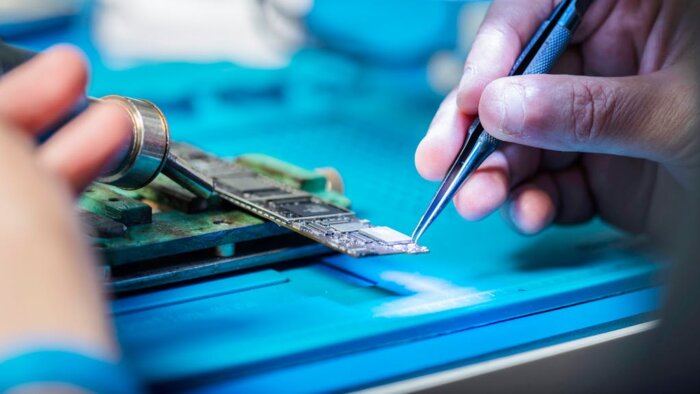
Framework solves this problem radically. The Laptop 16 consists of modules that can be replaced individually. CPU mainboard, GPU module, RAM, SSD, display panel, keyboard, trackpad, battery cells, and the expansion cards for the connections. Each component has its own product page with price, installation instructions, and compatibility matrix. The entire replacement of a GPU takes about 15 minutes. RAM and SSD take less than five minutes.
For IT departments managing device fleets, this has a concrete economic effect. In the office, three USB-C ports are used for the dock and peripherals plus one HDMI for the conference room projector. On the go, the HDMI is replaced with an additional SSD expansion. This change takes less than a minute and does not require a restart.
The keyboard is good but not outstanding. The hub is sufficient, the typing feel is between a ThinkPad (better) and a MacBook (similar). For heavy typists, an external mechanical keyboard is recommended at the desk. The trackpad is generously sized and supports multi-touch gestures under Linux via libinput.
The fan is barely audible under light load. Under CPU-intensive workloads such as compile runs or local AI inference, it becomes noticeably louder than on a MacBook Pro, but not unpleasant. The cooling performance is good: thermal throttling did not occur in four months, not even with longer CUDA workloads on the RTX-5070 module.
A highlight for everyday developer life: the repairability in a real emergency. After a coffee accident on the keyboard, the keyboard module could be replaced in 10 minutes. Spare part ordered via the Framework Marketplace, delivered three days later, installed, done. With a MacBook, this would have been a case for the workshop with a two-week waiting time and a four-digit repair bill.
Framework vs. MacBook Pro: Direct Comparison for Developers
The most obvious comparison: Framework Laptop 16 against MacBook Pro 16 inches with M5. The MacBook wins in build quality, battery life (14-16h vs. 8-10h), display quality (XDR OLED vs. IPS), and weight (2.14 kg vs. 2.4 kg). Framework wins in upgradability, port flexibility, Linux support, GPU choice (NVIDIA CUDA vs. Apple Metal), and long-term operating costs.
For macOS developers who need Xcode and Swift, there is no Framework alternative. For Linux developers who run CUDA workloads and want to upgrade their hardware over five years, there is no MacBook alternative. The target groups overlap less than the price suggests. Framework is for users who want maximum control over their hardware. MacBook is for users who prioritize maximum seamless integration and top-notch processing quality.
Sustainability: More Than a Marketing Label
Framework publishes detailed repair manuals for every component. Replacement parts are available individually through the Framework Marketplace, including small parts such as screws, cables, and hinges. The company uses recycled aluminum for the chassis and focuses on durable components instead of planned obsolescence.
The e-waste aspect is far from trivial and deserves special attention. The electronics industry generates around 62 million tons of electronic waste annually. Laptops that are fully replaced after three years contribute significantly to this. A Framework laptop, where only the relevant component is exchanged, measurably reduces material consumption. This is not greenwashing, but a demonstrable structural advantage of the modular approach compared to the buy-and-discard model.
For companies with ESG reporting obligations, this can be a relevant factor. Procuring modular hardware can be concretely quantified in sustainability reports more effectively than purchasing supposedly green off-the-shelf laptops. IT procurement officers who need to justify purchasing decisions to management have a strong argument with Framework for long-term cost reduction and sustainability goals.
Frequently Asked Questions
Can I completely assemble the Framework Laptop 16 by myself?
Yes. The DIY kit comes without RAM, SSD, or operating system. Framework provides illustrated step-by-step instructions. Assembly takes about 30 to 45 minutes and requires only a Phillips screwdriver. For developers who regularly configure hardware, this is straightforward.
How is hardware support handled?
Framework offers email support and an active community forum. Replacement parts are shipped within one to three business days. Support is helpful but not on the level of Dell ProSupport or Apple Genius Bar. For companies requiring next-business-day on-site service, this is a disadvantage.
Is the GPU module worthwhile for developers?
Yes, for developers running local AI inference, CUDA workloads, or occasional gaming. The RTX 5070 provides sufficient performance for Llama-3-70B inference and Stable Diffusion. For pure web development, DevOps, and cloud workflows, the integrated Radeon 890M is sufficient, and the GPU module can be omitted–saving around 610 euros and 300 grams.
What is the battery life like in everyday developer use?
Without the GPU module and under typical developer workloads (IDE, browser, terminal), battery life is approximately 8 to 10 hours. With the GPU module actively in use, this drops to 4 to 6 hours. The PRIME offloading feature under Linux allows the discrete GPU to be activated only when needed, significantly extending everyday battery life.
Editor’s Reading Recommendations
MacBook Pro M5 in Practice: ARM Chip vs. Windows on ARM
More from the MBF Media Network
Infostealers 2026: Session Cookie Theft and MFA Bypass (SecurityToday)
Data Act: What IoT Manufacturers in the SME Sector Need to Know (MyBusinessFuture)
Image source: Pexels / Jacob Yavin (px:12863086)
Translated from the German original using artificial intelligence. The German version is authoritative.


