

GPU Guide 2026: Which Graphics Card for Local AI Models?
GPU Guide 2026: RTX 5090 vs. 4090 vs. 3090 vs. AMD RX 7900 XTX. VRAM requirements for local AI models compared.
10 min. read
Local AI inference is becoming the standard workflow in 2026. Code completion, speech recognition, image generation, LLM experiments: everything runs faster and more privacy-compliant on your own hardware. But which graphics card do you actually need? VRAM is the decisive factor, not raw compute power. A comparison of the NVIDIA RTX 5090, RTX 4090, used RTX 3090, and AMD RX 7900 XTX, with concrete recommendations for different budgets and use cases.
Key Takeaways
- VRAM is the bottleneck for local AI models. Rule of thumb: 2 GB VRAM per billion parameters at FP16 precision. A 70B model needs at least 24 GB.
- The RTX 5090 with 32 GB GDDR7 is the only consumer card that runs 70B models locally in full Q4 quantization. Price: from around 1,742 euros.
- The RTX 4090 with 24 GB remains the best price-to-performance ratio for serious local AI work. It handles 8B models at 128 tokens per second.
- A used RTX 3090 with 24 GB VRAM for under 800 euros offers identical model capacity to the RTX 4090 at a third of the price.
- Cloud GPUs are worthwhile for sporadic use. From 4 hours of daily GPU utilization, local hardware is cheaper than any cloud provider.
Why VRAM Matters More Than TFLOPS
In gaming benchmarks, raw compute power is what counts. In AI inference, memory comes first. A large language model like Llama 3 70B requires around 40 GB of memory in Q4 quantization. If the model does not fit entirely into VRAM, it has to be offloaded to CPU RAM. That slows inference by a factor of 10 to 20. In practice this means: a 70B model on a 24 GB card will run, but with so much offloading that response times are barely usable.
Memory bandwidth determines how quickly the model can move data between GPU memory and compute units. The RTX 5090 reaches 1.79 TB/s here, a 78 percent improvement over the RTX 4090’s roughly 1 TB/s. For models that fit entirely into VRAM, this translates directly into faster token generation. The RTX 5090 achieves 185 tokens per second with 8B models; the RTX 4090 sits at 128. With 70B models in Q4, the RTX 5090 delivers 15 to 20 tokens per second, which is sufficient for interactive chat applications.
NVIDIA RTX 5090: The 32 GB Reference Card
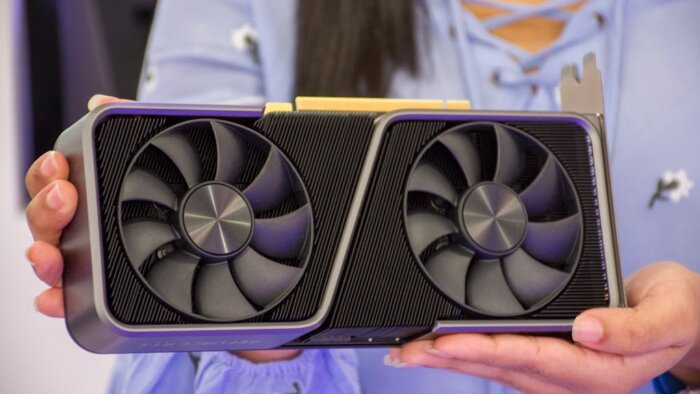
The RTX 5090 is based on NVIDIA’s Blackwell architecture, manufactured in TSMC’s 4NP process. 21,760 CUDA cores, 680 fifth-generation Tensor cores, 32 GB GDDR7 on a 512-bit bus. The official price is around 1,742 euros; in reality, cards have rarely been available for under 2,500 euros since their launch in January 2025.
For local AI work, the RTX 5090 is the only consumer card that runs 70B models in full Q4 quantization without offloading. That makes it the reference device for developers who regularly experiment with large language models. Llama 3 70B runs smoothly, Whisper Large transcribes audio in real time, and Stable Diffusion XL generates images in under 5 seconds.
The catch: 575 watts TDP. That requires a suitable power supply (at least 1,000 watts recommended), good case ventilation, and higher electricity costs. Over a year, power consumption adds up to 200 to 250 euros with four hours of daily use. That puts the cost advantage over cloud GPUs in perspective, but does not eliminate it.
RTX 4090: The Best Price-to-Performance Ratio
The RTX 4090 with 24 GB GDDR6X remains the most sensible choice for serious local AI work heading into 2026. The card delivers 128 tokens per second on 8B models and 52 tokens per second on Llama 3.1 70B at Q4. Since the RTX 5090 launched, new RTX 4090 prices have dropped to 1,400–1,600 Euro. Used units start at 1,100 Euro.
24 GB VRAM covers most real-world use cases: 8B and 13B models run without issue, 30B models at Q4 just barely fit, and 70B requires aggressive quantization to Q2 or offloading. If you primarily work with models up to 30B, generate images with Stable Diffusion XL, or use Whisper for transcription, you simply don’t need the 32 GB of the RTX 5090. The 4090’s 24 GB handles that workload completely.
Budget Pick: Used RTX 3090 Under 800 Euro
The RTX 3090 offers identical 24 GB VRAM to the RTX 4090 at significantly lower compute throughput. On the used market it sits at 600–800 Euro. Token rates land at around 112 tokens per second on 8B models and roughly 35 tokens per second on 70B Q4. That’s slower than the 4090, but sufficient for many workflows.
The business case is clear: for a third of the price, you get the same model capacity. Anyone who doesn’t need maximum inference speed – but wants local AI models for batch processing, offline transcription, or occasional LLM experimentation – gets the best deal from a used 3090. The higher power draw (350W TDP versus 450W on the 4090) is negligible for sporadic use.
One note on longevity: mining cards, which frequently turn up on the used market, are not necessarily worn out – contrary to popular belief. Mining runs GPUs at constant, moderate load with stable temperatures. That’s actually gentler than gaming sessions with their constant load spikes. Even so, a card with a verifiable history and ideally some remaining warranty is the smarter buy.
AMD Alternative: RX 7900 XTX with 24 GB
AMD’s RX 7900 XTX offers 24 GB VRAM for under 900 Euro, making it the best VRAM-per-euro card on the market right now. Inference performance sits at around 78 tokens per second on Llama 3 8B. That’s slower than NVIDIA’s cards, but adequate for many workflows.
The limitation is the software ecosystem. CUDA dominates the AI landscape. Most frameworks are optimized for NVIDIA. ROCm, AMD’s CUDA equivalent, has made notable progress over the past few months but hasn’t yet reached the same compatibility level. PyTorch runs stably on ROCm, but specialized tools like TensorRT and certain quantization frameworks require workarounds or don’t work at all. If you primarily use Ollama and llama.cpp, AMD offers a workable environment. If you depend on the full NVIDIA ecosystem, stick with GeForce.
AMD’s upcoming RX 9070 XT is built on the new RDNA 4 architecture with improved AI performance. The card is expected to ship with 16 GB VRAM, positioning it for models up to 13B. As a budget entry point into local AI inference it could be compelling – though practical value depends heavily on how quickly the ROCm ecosystem catches up. For developers who need to buy today, the RX 7900 XTX is the safe AMD choice.
Cloud GPU vs. Local Hardware: The FinOps Calculation
Cloud GPUs cost between €0.50 and €3.50 per hour depending on provider and model. An RTX 4090 instance at Lambda Labs runs around €0.75 per hour, an A100 80 GB roughly €2.00. Local hardware carries upfront costs but no ongoing rental fees.
The break-even math is straightforward: an RTX 4090 at €1,500 pays for itself after about 500 days – just under 1.5 years – at four hours of daily use priced against cloud rates of €0.75/h. For sporadic usage under one hour a day, the cloud wins. Anyone working several hours daily with local models saves significantly with their own hardware. Add the privacy advantage on top: local inference means no data in the cloud, no API dependencies, and no rising costs as usage scales.
One frequently overlooked factor is availability. Cloud GPU instances aren’t always ready on demand – particularly for popular models like the A100 or H100. Wait times ranging from minutes to hours are common. Local hardware is available immediately, with zero provisioning time. For development teams iterating across different models and needing fast feedback loops, that’s a meaningful productivity factor.
Looking at total cost of ownership (TCO) over three years: an RTX 4090 costs €1,500 upfront plus roughly €400 in electricity at four hours of daily use. The cloud equivalent at the same usage rate – €0.75 × 4 hours × 365 days × 3 years – comes to €3,285. The local setup saves around €1,400 over that period. The RTX 5090, with its higher purchase price, breaks even after about two years, then delivers even steeper savings beyond that point.
Recommendation by Use Case
Developers using Llama 3 8B or comparable models for code completion and chat can get by with a 16 GB VRAM card. The RTX 4070 Ti Super (16 GB), available from €650, is the sweet spot here. Whisper runs locally in real time, Stable Diffusion generates images in acceptable time, and smaller LLMs respond fluidly.
Anyone regularly working with 30B to 70B models or running multi-model setups needs 24 GB. The RTX 4090 (new or used) or AMD RX 7900 XTX are the options in this range. The 4090 is faster; the AMD is cheaper.
For power users who want to run 70B models locally without quantization trade-offs, or who work with multiple models in parallel, the RTX 5090 with 32 GB is the only consumer option. Those needing even more VRAM must turn to professional cards like the NVIDIA A6000 (48 GB) or Apple Silicon Macs with Unified Memory. A MacBook Pro M5 Max with 128 GB Unified Memory can theoretically load even 405B models – though at significantly lower inference speed than a dedicated GPU.
A pragmatic tip for teams: not every developer needs a top-tier GPU. A team setup with one or two RTX 4090/5090 cards as shared inference servers (via Ollama or vLLM on the network) paired with standard workstations for daily work is often more cost-effective than equipping every workstation with a high-end card. It saves budget, centralizes GPU management, and simplifies updates – models are refreshed once on the server rather than on every individual machine.
Frequently Asked Questions
Can I run a 70B model on a 24 GB card?
Yes, but with limitations. At Q4 quantization, Llama 3 70B requires around 40 GB. On a 24 GB card, part of the model gets offloaded to CPU RAM, which drops inference speed to roughly 5 to 10 tokens per second. That’s borderline for interactive use, but acceptable for batch processing.
Is a used mining GPU worth it for AI inference?
Generally, yes. Mining runs GPUs at constant, moderate load – which is actually gentler than gaming with its constant load spikes. A used RTX 3090 from the mining sector gives you 24 GB VRAM for 600 to 800 Euro. Look for verifiable provenance and any remaining warranty, and run a stress test before you commit to the purchase.
Is 8 GB VRAM enough for local AI models?
For small models up to 7B parameters at Q4 quantization, yes. Llama 3 8B runs on 8 GB with aggressive quantization, as does Whisper Small. For serious work with larger models, image generation, or multi-model setups, 8 GB simply isn’t enough. Treat 16 GB as the practical minimum.
Is an Apple Silicon Mac a real alternative to a dedicated GPU?
For inference, yes – with caveats. Apple Silicon uses unified memory shared between CPU and GPU, so an M5 Max with 128 GB can theoretically load very large models. That said, inference speed falls well short of a dedicated NVIDIA GPU because memory bandwidth is lower. For occasional LLM use it’s a practical option; for professional AI workflows, it’s no substitute.
Editor’s Reading Tips
MacBook Pro M5 in Practice: Apple’s ARM Chip vs. Windows on ARM
Serverless AI Is Overhyped – Here’s What Actually Matters
CES 2026: The Most Exciting Tech Innovations for IT Professionals
More from the MBF Media Network
Data Act: What IoT Manufacturers in the Mittelstand Need to Know (MyBusinessFuture)
Cyber Resilience Act: The 24-Hour Reporting Obligation from September 2026 (SecurityToday)
Cover image source: Pexels / Elias Gamez (px:10558582)


