

Lenovo ThinkCentre M75q Tiny Gen 5: AMD PRO Mini PC for Edge
Lenovo M75q Tiny Gen 5: AMD PRO, DASH remote management, MIL-STD-810H, 5W idle. Enterprise edge PC from €600.
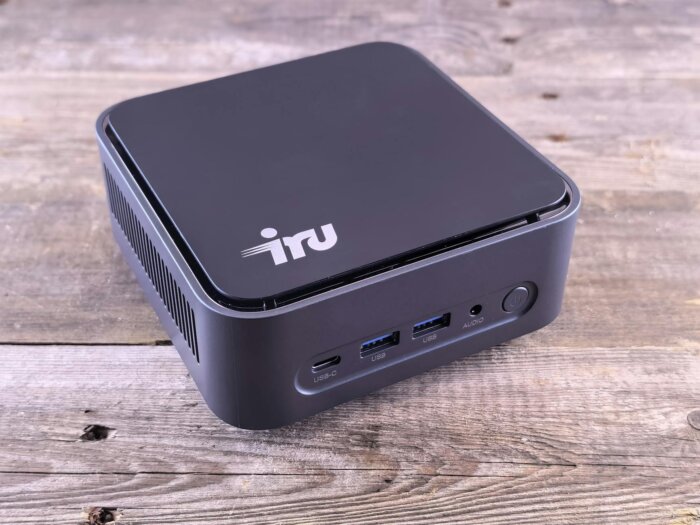
The Lenovo ThinkCentre M75q Tiny Gen 5 packs an 8-core AMD Ryzen 7 PRO 8700GE processor, a Ryzen AI NPU, two NVMe slots, and discrete TPM 2.0 into a chassis measuring just 179 x 183 x 37 millimeters. With idle power consumption of just 5 watts and weighing only 1.25 kilograms, the M75q isn’t a desktop replacement-it’s a managed edge node that can be remotely controlled via AMD DASH, mounted to any monitor using a VESA bracket, and operated for up to ten years with Windows IoT Enterprise LTSC.
Key Facts at a Glance
- AMD Ryzen 7 PRO 8700GE (8 cores, 16 threads, up to 5.1 GHz, 35 W TDP) with Radeon 780M integrated GPU and Ryzen AI NPU for local inference. Six additional CPU options ranging from Ryzen 3 to Ryzen 7 (Lenovo PSREF, March 2026).
- Officially supports up to 32 GB DDR5-5200 across two SO-DIMM slots. ServeTheHome reports stable operation with 128 GB (2x 64 GB using third-party modules).
- Two M.2-2280 NVMe slots with PCIe 4.0 x4 (each supporting up to 2 TB) plus one additional M.2 slot dedicated to Wi-Fi cards. No 2.5-inch drive bay included.
- Supports up to four independent displays via HDMI 2.1, DisplayPort 1.4, and optional punch-out ports on the rear panel (Lenovo PSREF).
- MIL-STD-810H certified, discrete TPM 2.0 (FIPS 140-2 compliant), and AMD DASH for out-of-band management. OS options: Windows 11 Pro, IoT Enterprise LTSC 2024, Ubuntu, and IGEL Linux (Lenovo PSREF).
CPU: AMD Ryzen PRO 8000GE with AI Accelerator
Lenovo offers the M75q Gen 5 in eight CPU variants, all bearing the “GE” suffix: a 35-watt TDP instead of the standard 65 watts. The top-tier option is the Ryzen 7 PRO 8700GE, featuring 8 cores, 16 threads, and a boost clock of 5.1 GHz. Its integrated Radeon 780M (RDNA 3) graphics deliver enough GPU power to drive four displays simultaneously, provide hardware-accelerated video encoding, and handle light graphics workloads.
What sets the M75q apart from consumer-grade mini PCs is that PRO models starting with the Ryzen 5 PRO 8600GE include a dedicated NPU (Neural Processing Unit)-AMD Ryzen AI. This provides a meaningful advantage for on-device inference tasks such as document classification, edge-based speech recognition, or AI-powered image analysis without requiring cloud connectivity. The NPU operates independently of both the CPU and GPU, meaning AI workloads run in parallel with regular system tasks-without impacting overall performance.
ServeTheHome benchmarked the Ryzen 7 PRO 8700GE variant against the Minisforum MS-A1 (which uses the same chip in its 65-watt Ryzen 7 8700G configuration). Result: the GE chip was 5% to 20% slower in synthetic benchmarks but consumed only 63-66 watts under sustained load, compared to 80-95 watts for the higher-TDP version. In edge deployments where dozens of devices run 24/7, this difference accumulates to hundreds of euros in annual electricity savings per unit.
Memory and Storage: DDR5 and Dual NVMe
Two SO-DIMM slots support DDR5-5200 in dual-channel mode. Lenovo officially supports up to 32 GB (2x 16 GB). In practice, however, ServeTheHome and the community report stable operation with 64 GB (2x 32 GB Special Bid modules) and even 128 GB (2x 64 GB third-party modules). Users requiring more than 32 GB will be operating outside Lenovo’s officially supported configuration-but it works.
The two M.2-2280 NVMe slots with PCIe 4.0 x4 support up to 4 TB of local flash storage. This is sufficient for a complete edge deployment: the operating system on the first SSD, application data and local AI models on the second. Opal 2.0 self-encrypting SSDs are configurable at the factory-ideal for organizations that prefer hardware-based drive encryption without the overhead of BitLocker.
There is no 2.5-inch drive bay. Users requiring SATA storage will need to opt for a larger model. For edge deployments, this isn’t a drawback-NVMe-only simplifies configuration and eliminates a potential point of failure.
Connectivity: 4 Displays, Optional Serial Port
The port selection clearly shows that Lenovo designed the M75q as an enterprise-grade device. Front: one USB-C (10 Gbit/s) and two USB-A ports (10 Gbit/s, one of them Always-On for peripheral charging). Rear: HDMI 2.1, DisplayPort 1.4, Gigabit Ethernet, one USB-A (10 Gbit/s), and three USB 2.0 ports for legacy peripherals.
The standout feature is the two optional punch-out slots on the rear panel. Depending on configuration, these can accommodate a second DisplayPort, a second HDMI, a VGA port, an RS-232 serial interface, or additional USB ports. The serial port isn’t an anachronism-it remains standard in manufacturing, point-of-sale systems, and building automation. Lenovo’s inclusion of it as an option underscores the device’s enterprise focus.
What’s missing: 2.5-GbE Ethernet. The M75q ships with a Realtek RTL8111FP-Gigabit Ethernet, nothing more. For platform engineering teams looking to deploy the M75q as an edge server, this is a limitation. Those needing higher network bandwidth must resort to a USB-to-2.5GbE adapter-or choose a different device altogether. USB4 and Thunderbolt are also entirely absent.
AMD PRO and DASH: What Consumer PCs Don’t Offer
AMD PRO is more than just a marketing label. The PRO variants of the Ryzen 8000 series include AMD DASH-Desktop and Mobile Architecture for System Hardware. DASH enables out-of-band management: an IT administrator can power the M75q on or off over the network, access the system at the BIOS level, and retrieve hardware inventory-regardless of the operating system’s state. This is AMD’s equivalent to Intel’s vPro AMT.
For fleet deployments involving hundreds of devices across distributed locations, this capability marks the critical difference from consumer-grade mini PCs. If an M75q at a kiosk location becomes unresponsive, the administrator can trigger a remote reboot via DASH or deploy a fresh image using PXE boot-all without needing to be physically present.
Complementing the management features is a robust security suite: discrete TPM 2.0 (FIPS 140-2 certified) instead of the firmware-based TPM (fTPM) commonly found in consumer devices. A chassis intrusion switch alerts administrators if the case is opened. Secure Wipe erases SSDs at the hardware level, and Smart USB Protection lets admins disable individual USB ports-essential in environments with strict compliance requirements.
Power Consumption and Form Factor
ServeTheHome measured the Ryzen 7 PRO 8700GE variant drawing 5 to 15 watts at idle and 63 to 66 watts under sustained load-less than half the consumption of a desktop PC using the same chip in its 65-watt TDP configuration. For 24/7 deployments, this translates to roughly €3 to €5 in monthly electricity costs per device, depending on workload and local tariff.
The chassis measures 179 x 183 x 37 millimeters and weighs 1.25 kilograms. A VESA mount kit (supporting both 75 mm and 100 mm standards) lets you discreetly tuck the M75q behind a monitor. MIL-STD-810H certification confirms resilience against vibration, temperature swings, and humidity-a durability benchmark no consumer-grade mini-PC meets, and one that matters for regulated industries and critical infrastructure deployments.
Three power adapter options are available: 65 watts, 90 watts, and 135 watts (the latter intended for Ryzen 7 PRO configurations paired with Lenovo’s ThinkVision TIO monitor). All three are external adapters rated at 89% efficiency with automatic voltage adjustment (100-240 VAC).
M75q Gen 5 vs. Competition
| Criteria | Lenovo M75q Gen 5 | HP EliteDesk 805 G9 Mini | Minisforum MS-A1 |
|---|---|---|---|
| CPU | Ryzen 7 PRO 8700GE (35W) | Ryzen 7 PRO 6850U (28W) | Ryzen 7 8700G (65W) |
| RAM (max) | 32 GB DDR5 (officially supported) | 64 GB DDR5 | 96 GB DDR5 |
| M.2 NVMe | 2x PCIe 4.0 x4 | 1x PCIe 4.0 x4 | 2x PCIe 4.0 x4 |
| Ethernet | 1 GbE | 1 GbE | 2x 2.5 GbE |
| DASH / vPro | AMD DASH | AMD DASH | No |
| MIL-STD | 810H | 810H | No |
| Price (approx.) | 600-800 EUR | 700-900 EUR | 400-500 EUR |
The Minisforum MS-A1 wins on raw performance, RAM capacity, and network connectivity-but sacrifices DASH remote management, MIL-STD certification, and enterprise-grade support. For a single device in a homelab setup, the MS-A1 is the better choice. However, for fleets of 50 or 500 devices requiring centralized management, there’s no viable consumer alternative to the M75q and its enterprise counterparts from HP.
Pricing Overview
ServeTheHome reports approximately $800 for the Ryzen 7 PRO 8700GE configuration with 16 GB RAM and a 512 GB SSD. Community reports cite $600 for configurations featuring 32 GB RAM and a 1 TB SSD through Lenovo resellers. In Europe, street prices range from €600 to €800 depending on configuration and procurement channel.
The entry-level Ryzen 3 PRO 8300GE configuration sits significantly lower in price and is sufficient for thin-client, kiosk, and digital signage scenarios where the CPU rarely operates under heavy load. Organizations purchasing 200 devices should negotiate directly through Lenovo’s enterprise sales channel-list prices serve as a starting point for negotiation, not the final cost.
Who the M75q Gen 5 is worth it for-and who should look elsewhere
In its favor
- AMD DASH for out-of-band remote management
- Discrete TPM 2.0 (FIPS 140-2) instead of fTPM
- MIL-STD-810H certification at just 1.25 kg weight
- 5-15 watt idle power draw-ideal for 24/7 fleet deployments
- Ryzen AI NPU enables local inference without cloud dependency
Against it
- Only 1 GbE Ethernet-no 2.5GbE or 10GbE
- No USB4 or Thunderbolt support
- Officially maxes out at 32 GB RAM (64 GB available only via special bid)
- 35W TDP limits sustained workload performance
- No 2.5-inch bay for SATA storage
Conclusion
The Lenovo ThinkCentre M75q Tiny Gen 5 isn’t a mini-PC for enthusiasts. It’s a managed endpoint designed for IT departments operating hundreds of devices across distributed locations. Features like AMD DASH, discrete TPM, MIL-STD certification, and Windows IoT Enterprise LTSC turn it into an edge node capable of remaining in the field for up to ten years-remotely maintained, fully encrypted, and with power consumption so low it barely registers on an annual energy bill.
If you need raw performance, ample RAM, or high-speed networking, consider a Minisforum system or build your own homelab node. But if you require a device that an IT administrator can reboot remotely at 3 a.m. without having to drive to the site, the M75q delivers exactly that-in a chassis small enough to tuck behind a monitor and consuming less power than a desk lamp.
Frequently Asked Questions
Can the M75q Gen 5 be used as a thin client?
Yes. Lenovo offers IGEL Linux and Windows IoT Enterprise LTSC as operating system options-both optimized for thin-client scenarios. IGEL Linux turns the M75q into a full-fledged thin client with centralized management via the IGEL Universal Management Suite. The Ryzen 3 PRO configuration is sufficient for this use case.
Does AMD DASH work like Intel vPro AMT?
Conceptually, yes: both enable out-of-band management over the network-including remote power control, BIOS access, and hardware inventory. In practice, however, vPro AMT enjoys broader tool support and deeper integration with enterprise software ecosystems. DASH covers core functionality but is less widely adopted in large-scale enterprise management suites. For SMEs and midsize businesses, DASH is usually sufficient.
Is the Ryzen 7 PRO variant worth it, or is Ryzen 5 enough?
For thin-client, kiosk, and digital signage deployments, the Ryzen 5 PRO 8500GE-or even the Ryzen 3 PRO-is adequate. The Ryzen 7 PRO variant makes sense if you plan to run local AI inference (via the NPU), simultaneous multi-monitor workloads, or Docker containers directly on the device. All variants share the same 35-watt TDP limit.
Can the M75q Gen 5 run Linux?
Yes. Lenovo officially supports Ubuntu and IGEL Linux as OS options. ServeTheHome reports smooth operation under Ubuntu 24.04. The AMDGPU driver for the integrated graphics is included in the mainline kernel, and Wi-Fi and Bluetooth work with recent kernels. The Ryzen AI NPU requires the XDNA driver under Linux, which is still under active development.
How many devices can be centrally managed via AMD DASH?
DASH itself imposes no device limit-it’s a protocol, not a centralized service. The actual scalability depends on your management tool: solutions like Microsoft SCCM and ManageEngine that support DASH can scale to thousands of devices. For smaller fleets, even a simple script using the WS-Management protocol can effectively interact with DASH endpoints.
Source for header image: Pexels / Andrey Matveev (px:36065602)
Translated from the German original using artificial intelligence. The German version is authoritative.


