

72 terabytes for 500 euros: is the mini PC NAS worth it?
Tech review: The Beelink ME Pro packs 72 TB and dual networking into a mini PC.
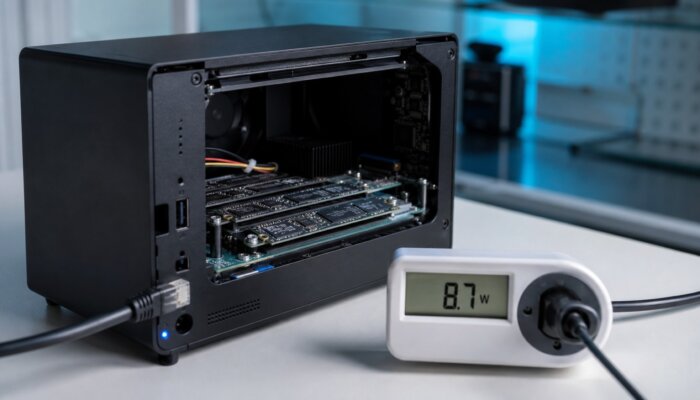
A box for 500 Euro that packs 72 terabytes, comes with two network ports at 5 and 2.5 gigabit, and draws barely more power than a desk lamp in continuous operation. The Beelink ME Pro represents a device class that reshapes Edge and Branch storage. The question is not whether the concept works, but where it shines and where it falls short.
Key Takeaways
- Much hardware for little money: The Beelink ME Pro combines an Intel N95 or N150 CPU, up to 16 GB LPDDR5, two SATA drives, and three M.2 slots in a compact space. Maximum raw capacity of 72 TB, priced between 370 and 560 Euro depending on configuration.
- The power consumption is the real argument: In NAS operation, the device draws between 10 and 35 watts depending on the load. Compared to an old 1U server, it saves about 100 Euro in electricity costs annually in continuous operation.
- It remains consumer hardware: No ECC memory, no redundant power supply, no enterprise-level manufacturer support. Sufficient for non-critical Edge and backup tasks, but not suitable as primary storage for productive data.
Related: Mini-PCs are replacing 1U servers: Edge computing in the data center 2026 / Lenovo ThinkEdge SE60n Gen 2: Where Edge computing outperforms the cloud
What the Beelink ME Pro Offers on Paper
What is a Mini-PC NAS? A Mini-PC NAS is a compact computing device specifically designed for storage tasks: multiple hard drive bays, fast network ports, and a power-efficient CPU in a palm-sized chassis. Unlike a pre-configured NAS appliance, it only provides the hardware, leaving the choice of storage operating system to the user.
The Beelink ME Pro has been on the market since early 2023 and belongs to a device category that has gained significant traction in recent months: the Mini-PC designed to function as a NAS. The motherboard is modular, and can be equipped with either an Intel N95 or N150 processor. Both are quad-core processors without Hyperthreading, designed for storage tasks rather than computational load.
The device truly shines in its storage capabilities. It supports two SATA hard drive bays, each accommodating 3.5-inch drives up to 30 TB. Additionally, there are three M.2 NVMe slots, each capable of 4 TB. In its fully configured state, the device offers 60 TB of storage on hard drives plus 12 TB of flash storage, totaling 72 TB in a chassis that fits in the palm of your hand. Networking features include a 5 Gigabit and a 2.5 Gigabit Ethernet port, Wi-Fi 6, a 10 Gbit/s USB-C port, and HDMI 2.0.
Pricing ranges from approximately 370 to 560 Euros, depending on the CPU and storage configuration. This is the first point that raises eyebrows. A pre-configured dual-bay NAS appliance from a reputable manufacturer often costs more without the drives included. The additional three NVMe slots are rarely found in such appliances.
| Criteria | Mini-PC NAS | Appliance NAS | 1U Rack Server |
|---|---|---|---|
| Acquisition Cost | Low | Medium | High |
| Power Consumption | Very Low | Low | High |
| Software | Self-installed | Pre-configured | Self-installed |
| Redundancy and Support | Consumer Level | Manufacturer’s Warranty | Enterprise SLA |
Classification by device category, not individual measurement.
Mini-PC as NAS: Where the Concept Shines
Independent tests from TechRadar, NASCompares, and CNX-Software have consistently portrayed the ME Pro since early 2026. This article is based on these published tests and the manufacturer’s data, not on our own lab tests. As a Windows Mini-PC, the performance of the N-Series remains manageable. However, as a NAS with file services, backup targets, and media server capabilities, the device operates smoothly and quietly, which aligns with its intended purpose.
The most obvious application is in branch offices. A branch office, construction site, or small workshop without dedicated server space rarely requires a rack. It needs a local backup target, file storage, and perhaps a cache for cloud data. This is where a device with dual networking and 72 TB expandable storage truly excels, without the need for climate control or noise.
The two network ports are not just decorative. The 5-Gigabit port supports fast local network access, while the second port can be used for separate management or backup networks. For a branch office that wants to separate its backups from production traffic, this is a practical advantage.
Even in a home lab or test environment, the value is clear. Someone running a stripped-down tower server as a testing ground pays a noticeable monthly electricity bill. A Mini-PC NAS handles the same tasks—containers, a few virtual machines, a storage pool—at a fraction of the power consumption. This is not a matter of taste but a question of operational costs.
The Bottom Line: Electricity and Operational Costs
The Intel N-Series is designed for low idle power consumption. In idle mode, a Mini-PC of this class typically draws only 6 to 10 watts. With two spinning hard drives and active load, the total system draws around 20 to 35 watts, depending on the configuration. This is the figure that makes the purchase worthwhile or not.
Specifically, a system drawing an average of 25 watts will consume approximately 219 kilowatt-hours per year. At €0.35 per kilowatt-hour, this amounts to about €77. An older rack server drawing 60 watts would cost around €184. Over a typical five-year usage period, this difference accumulates to an amount that exceeds the Mini-PC’s purchase price.
This calculation is the reason why the device class is gaining ground in edge environments. It does not replace data center operations. It replaces the forgotten server under the branch office’s desk that has been consuming electricity for years without anyone maintaining it.
Where the Mini-PC Reaches Its Limits
The honest evaluation requires the second part. The ME Pro is consumer hardware, and it stays that way with five storage slots. There is no ECC memory to catch bit errors in the RAM. There is only one power supply, no redundancy. If it fails, the device stops. The manufacturer support operates at the level of an end-user product, not a maintenance contract with a response time.
What Works Against Primary Use
- No ECC Memory
- Single Power Supply without redundancy
- Support at end-user level
What Works for Secondary Use
- Low Operating Costs
- Ample Expansion Potential for storage
- Quiet Operation without climate control
Additionally, there is the software question. Unlike an appliance with a pre-installed operating system, a Mini-PC NAS only provides the hardware. Those who install TrueNAS, Unraid, or a Linux distribution with storage services gain full control. Those expecting a ready-to-use system with a maintained update path will not find it. This is not a deficiency but a design choice. It merely shifts the work from procurement to operation.
The two SATA slots also set a limit. More than a mirror of two drives is not possible with this setup. Those needing RAID with distributed parity and multiple drive redundancy require more slots than this case offers. The three NVMe slots do little to change this, as they prioritize speed over the redundancy of large data volumes.
For Whom the Investment Is Worth It
The Beelink ME Pro and its device class are a good choice for clearly defined tasks. As a local backup target in an outpost, as an edge cache node, or as a storage pool in a lab. Anywhere where data loss is inconvenient but not existential because a second copy exists elsewhere.
For primary storage with business-critical data, the advice remains unchanged. There, ECC memory, redundant power supplies, and a maintenance contract are necessary. The Mini-PC NAS does not replace the data center. It fills the gap between external hard drive and fully grown server. This gap was once surprisingly expensive to fill.
Those who purchase this device class with this understanding make a clean decision. Those who use it for something it is not designed for will learn the difference the first time it fails. This is rarely a good teaching moment in hardware.
Frequently Asked Questions
Can a Mini-PC-NAS replace a traditional NAS appliance?
For non-critical tasks, yes, but for productive primary storage, only to a limited extent. A Mini-PC-NAS like the Beelink ME Pro provides the hardware, while the storage operating system must be set up by the user. An appliance comes with a maintained system, costs more, and offers fewer expansion slots.
How much power does the Beelink ME Pro consume?
In idle mode, it typically consumes between 6 and 10 watts. With two active hard drives and load, the total system, depending on configuration, can reach about 20 to 35 watts. Compared to an old rack server, this can save around 100 euros in electricity costs per year in continuous operation.
What is the maximum storage capacity of the device?
The Beelink ME Pro supports up to two SATA hard drives with a capacity of 30 TB each and three M.2 NVMe SSDs with a capacity of 4 TB each. In maximum configuration, this results in 60 TB of magnetic storage plus 12 TB of flash storage, totaling 72 TB of raw capacity.
Is the device class suitable for business-critical data?
Not as the sole primary storage. It lacks ECC memory, redundant power supply, and enterprise support. For business-critical data, a solution with these features is still the best choice. However, it is well-suited as a secondary backup target or edge storage.
Which operating system runs on a Mini-PC-NAS?
The choice is up to the user. Common options include TrueNAS, Unraid, or a Linux distribution with storage services. The pre-installed Windows is rarely the best option for NAS operation. This freedom provides control but shifts the effort from procurement to ongoing operation.
Source Title Image: Pexels / Collab Media (px:15059763)
Title Image: AI-generated (May 2026)
Image source: AI-generated (May 2026), C2PA certificate embedded in image
Translated from the German original using artificial intelligence. The German version is authoritative.


